Boundary
Stress-test engineering decisions before they harden.
A local-first, MCP-native multi-agent debate system that surfaces hidden assumptions, irreversible commitments, and failure modes.Boundary stays out of your way — until you cross something that cannot be undone.
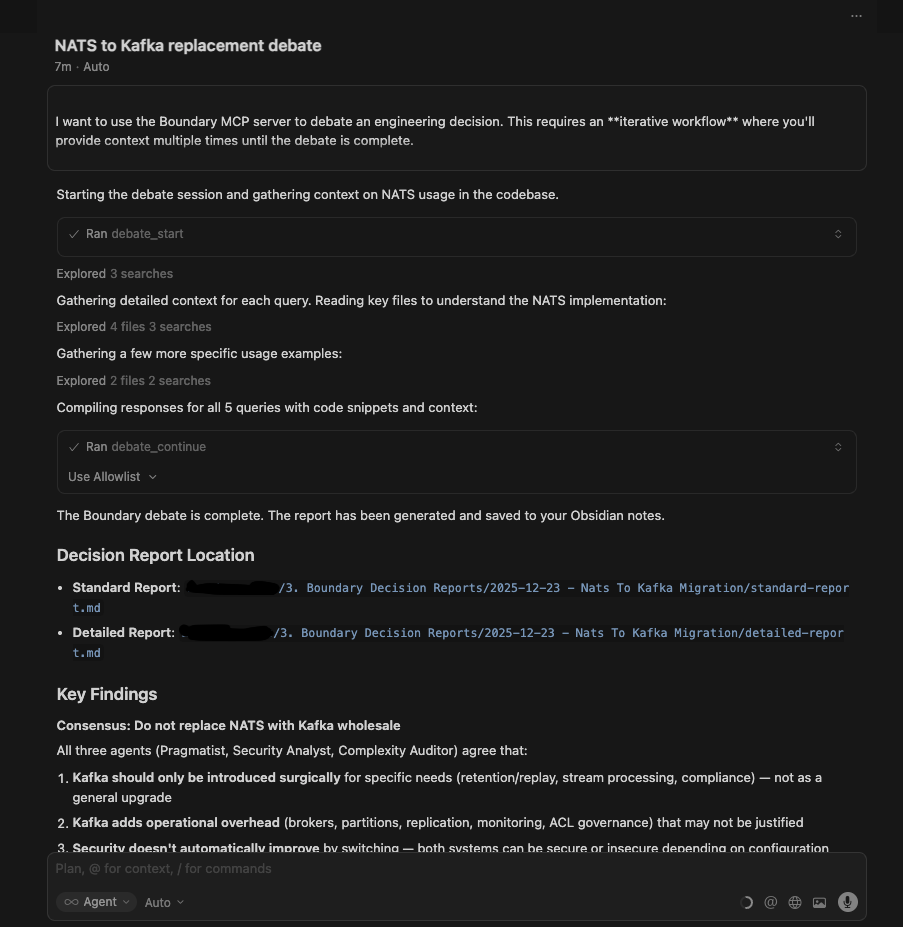
Live debate
NATS vs Kafka
“If you shard the database now, you are committing to operational complexity that will be extremely hard to undo later. What concrete load do you expect in the next 12 months?”
How Boundary Works
Engineering decisions are not "right answer" problems. They are context-sensitive trade-off problems. Boundary preserves the tension between competing values through structured adversarial reasoning.
Frame the Decision
Present your engineering decision to Boundary. The system ingests your codebase context, architectural constraints, and the specific boundary you're approaching. This is where irreversible commitments begin to form.
Agents Take Positions
Opinionated AI agents with consistent biases materialize. The Pragmatist, Security Analyst, Complexity Auditor, Scalability Maximalist, and Domain Purist each take positions. They are not neutral. Their disagreement is the feature, not a bug.
Structured Adversarial Review
Agents engage in structured rounds of critique. Each perspective challenges the others' assumptions, exposing hidden trade-offs, alternative failure modes, and competing engineering values. The tension between positions illuminates the decision space.
Map the Risk Surface
The system extracts failure modes, irreversible commitments, and assumption dependencies from the debate. You receive a clear map of decision risk—not probabilities, but concrete failure vectors that emerge from the agent conflict.
Synthesize the Decision Map
Boundary synthesizes all perspectives into a structured decision map—not a verdict, but an auditable record of trade-offs, assumptions, and failure modes. This becomes your decision memory, queryable for future reference when similar boundaries emerge.
Opinionation is Key: The Agent Mindsets
Neutral agents are useless. Each agent embodies a consistent bias that mirrors how senior engineers naturally reason in roles:
- •Pragmatist: "Adding Kafka might be overkill for current load. Are we solving a problem we don't have?"
- •Security / Threat Analyst: "This introduces an unverified auth path — any mistake could expose sensitive data."
- •Scalability Maximalist: "If user traffic doubles in a month, this design will fail catastrophically unless we plan for partitioning."
- •Complexity Auditor: "Each additional microservice adds a mental overhead and testing burden; is it justified?"
- •Domain Purist: "The proposed schema violates the invariants of our billing domain — this will create bugs downstream."
The debate is not about answers. It's about decision risk surfaces. The output is not a verdict. It is a decision map.
Pricing Tiers
Local-first architecture. Your data, your infrastructure, your control.
Free
1 user
Unlimited usage until premium tiers launch
- Unlimited debates (until premium tiers are available)
- All core agent types
- Local decision storage
- Decision history persistence
- Export capabilities
- Web dashboard access
- Cloud sync
- Team collaboration
Team (Local-Only)
Base price for 10 seats
+ €5/seat/month beyond 10
- Unlimited debate sessions
- All agent types
- Team workspace (local)
- All data stays on your infrastructure
- Cloud sync
- Web dashboard access
- Cross-device access
Team (Cloud Sync)
Base price for 10 seats
+ €5/seat/month beyond 10
- Everything in Team (Local-Only)
- Cloud sync of decision reports
- Web dashboard access
- Cross-device access
- Org-wide search and filtering
- Decision tagging and organization
- Team collaboration features
- Optional telemetry (opt-in)
Deploy the Agents
Pull the Boundary MCP server container and initialize your local decision memory.Local-first architecture. Your codebase, your boundaries, your control.
Container Registry
Pull the official Boundary MCP server image. The agents await deployment:
docker pull ghcr.io/boundary-mcp/boundary-mcp:latestInitialization Protocol
- 1
Pull the container image
Execute the docker pull command to retrieve the Boundary MCP server image
- 2
Configure agent access
Boundary works with OpenAI, Google, and Anthropic LLM providers. Set any or all of the API keys:
OPENAI_API_KEY,GOOGLE_API_KEY, and/orANTHROPIC_API_KEY. OpenAI will be used by default if available. - 3
Initialize the server
Deploy the Boundary MCP server container using Docker or Docker Compose. The agents will initialize and await your first decision query.
- 4
Establish MCP connection
Configure Cursor's MCP settings to connect to the Boundary server. The agents are now accessible through Cursor's interface.